Build and run#
Supported distros: Jazzy, Kilted, Lyrical, Rolling.
Build#
rko_slam depends on rko_lio at build time, and both have to be built in the same workspace.
cd <ws>/src
git clone https://github.com/PRBonn/rko_lio
git clone https://github.com/PRBonn/rko_slam
cd <ws> && rosdep install --from-paths src --ignore-src -y
colcon build --packages-select rko_lio rko_slam
Tests are off by default; add -DRKO_SLAM_BUILD_TESTS=ON to the cmake args and run
colcon test --packages-select rko_slam.
-DRKO_SLAM_ENABLE_PROFILING=ON makes a run report where its time went, in *_profile.txt of a SLAM run with
dump_results:=true.
Run#
Three entrypoints: slam.launch.py (mode:=online|offline), odometry_and_slam.launch.py, and align.launch.py. -s
lists every parameter with its documentation, and anything you leave unset keeps the node’s own default. What each
parameter does is on the Configuration page.
ros2 launch rko_slam slam.launch.py -s
Online#
Next to a running rko_lio, give rko_slam rko_lio’s deskewed scan and the IMU rko_lio reads. rko_lio publishes that scan
with publish_deskewed_scan:=true, or with rviz:=true and its default view:
ros2 launch rko_slam slam.launch.py lidar_topic:=/rko_lio/deskewed_scan imu_topic:=/your/imu
The IMU levels the map, see How it works. The IMU’s frame has to be connected to base_frame by a
static transform on TF. Without an IMU, leave imu_topic unset.
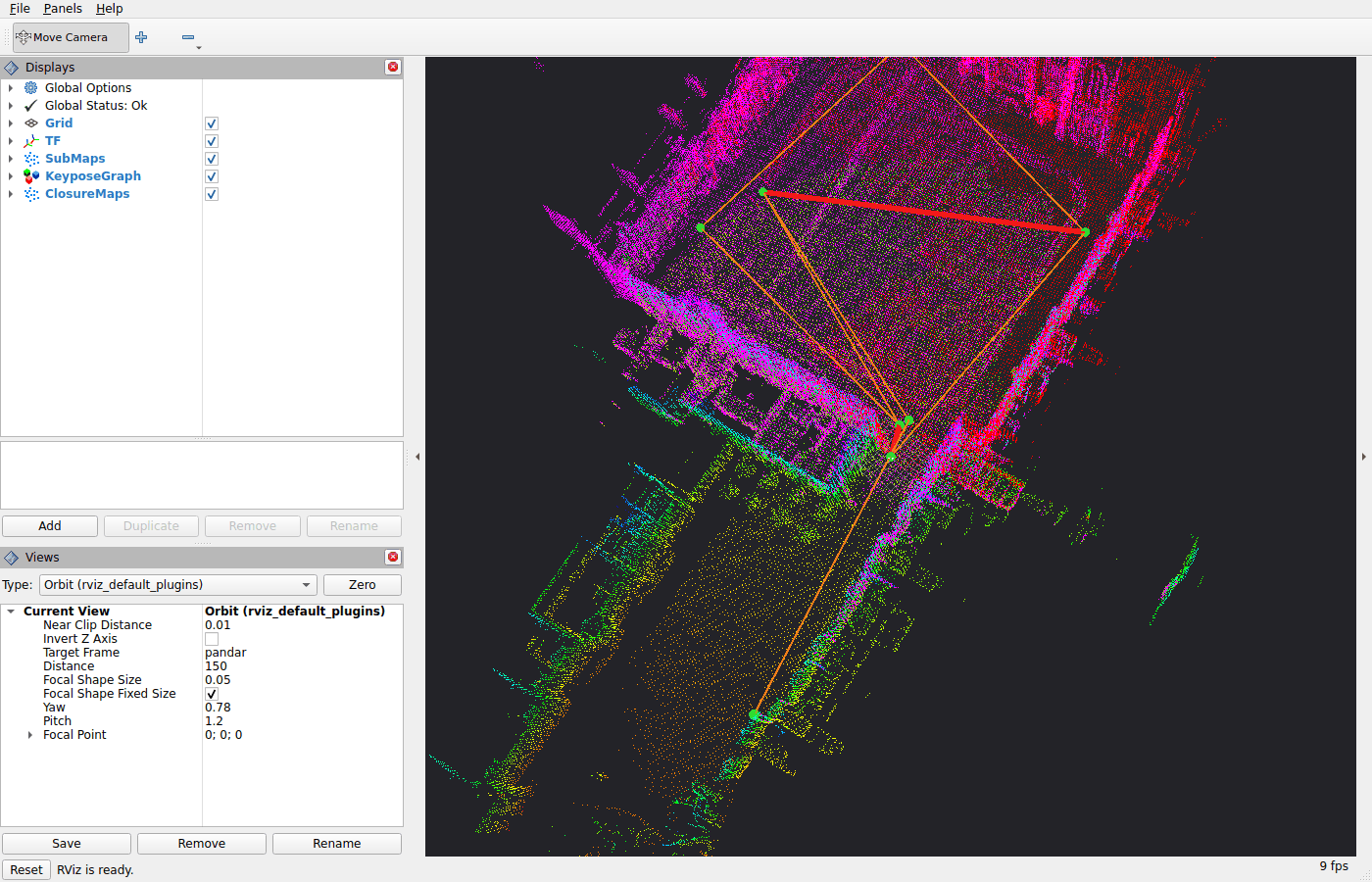
Add rviz:=true to open RViz with the default view: sub-maps, keypose graph and closures.
To run the odometry too, use the other entrypoint, see Running rko_lio with it:
ros2 launch rko_slam odometry_and_slam.launch.py
From a bag, start ros2 bag play <bag> --clock first, then either launch with use_sim_time:=true.
The odometry#
rko_lio is the default. rko_slam asks two things of any odometry: that its pose is on TF, as described under Frames, and that it is locally consistent. The loop closing corrects the drift; it does not repair a jump. Any LiDAR odometry qualifies. In my thesis the same back-end ran unchanged on top of Kinematic-ICP, which fuses a LiDAR with wheel odometry.
Raw scans need deskew:=true, and rko_slam deskews them itself with the same TF:
ros2 launch rko_slam slam.launch.py lidar_topic:=/points imu_topic:=/imu base_frame:=base_link deskew:=true
Deskewing needs per-point timestamps; a scan without them is dropped with a warning. rko_slam cannot tell a raw scan from a deskewed one.
If its odometry frame is not odom, give odom_frame as well. If it publishes odom_frame as the TF child of
base_frame, set invert_map_tf:=true, and rko_slam publishes map_frame as the child of odom_frame.
Offline#
Offline, the node drains the bag as fast as it can process it. The odometry comes from the bag’s own /tf:
ros2 launch rko_slam slam.launch.py mode:=offline bag_path:=/data/my_bag \
  lidar_topic:=/rko_lio/deskewed_scan imu_topic:=/imu
A raw sensor bag, with no odometry on /tf, gives repeated warnings and no trajectory, pose graph or sub-maps.
odom_tum_path takes the odometry from a TUM trajectory file instead, see Frames:
ros2 launch rko_slam slam.launch.py mode:=offline bag_path:=/data/my_bag \
  lidar_topic:=/points imu_topic:=/imu base_frame:=base_link deskew:=true \
  odom_tum_path:=/data/odometry_tum.txt
dump_results:=true writes the run to disk, see Outputs:
ros2 launch rko_slam slam.launch.py mode:=offline bag_path:=/data/my_bag \
  lidar_topic:=/rko_lio/deskewed_scan imu_topic:=/imu \
  dump_results:=true results_dir:=results run_name:=my_run
Multi-session alignment#
align.launch.py is an offline step: it merges the run directories of several runs of the same place into one frame.
Each run directory must come from a run with dump_results:=true, hold its sub_maps/ (dump_sub_maps, on by
default), and keep the name it was written with:
ros2 launch rko_slam align.launch.py run_dirs:="[results/day_1_0, results/day_2_0]"
Running rko_lio with it#
odometry_and_slam.launch.py starts an rko_lio online node next to rko_slam and wires the two together. It is online
only.
It sets these. Passing the rko_slam ones is an error:
parameter |
value |
|---|---|
rko_lio’s |
true, it is what rko_slam subscribes to |
rko_slam’s |
rko_lio’s deskewed scan topic |
rko_slam’s |
rko_lio’s |
rko_slam’s |
false, that scan is already deskewed |
rko_slam’s |
rko_lio’s |
base_frame, odom_frame and use_sim_time are set once and passed to both nodes. Everything else is rko_slam’s,
exactly as under slam.launch.py.
rko_lio’s own settings, its raw lidar_topic and imu_topic among them, come from rko_lio_config_file, which turns
autodetection off. The file is rko_lio’s flat format, without ros__parameters, and must set lidar_topic, imu_topic
and, unless given to this launch file, base_frame. It is used as it is, except that publish_deskewed_scan is forced
true and base_frame, odom_frame and use_sim_time, when given to this launch file, override it. A file that sets
publish_deskewed_scan: false is refused.
Without the file, rko_lio configures itself with its autodetection, which needs:
exactly one
sensor_msgs/PointCloud2and exactly onesensor_msgs/Imutopic in the graph. With noPointCloud2topic, exactly onepoint_cloud_interfaces/CompressedPointCloud2topic is used instead;a non-empty TF tree, in which both sensor frames transform to the base frame once a message has arrived on each topic, so the static transforms must already be up. With
base_framepassed, only the topics are looked up.
The base frame is the first of base_link, base_footprint and base on TF when the TF tree first appears. With none
of them, it is the LiDAR frame, and the odometry and map transforms are published inverted. Each wait gives up after
autodetect_timeout (10 s) of wall-clock time, so start the robot or the bag first. LiDAR and IMU messages that share
one frame_id, with no TF from it to a base frame, as with a Livox and its built-in IMU, need the config file with
identity extrinsics:
lidar_topic: /livox/lidar
imu_topic: /livox/imu
base_frame: livox_frame
extrinsic_lidar2base_quat_xyzw_xyz: [0.0, 0.0, 0.0, 1.0, 0.0, 0.0, 0.0]
extrinsic_imu2base_quat_xyzw_xyz: [0.0, 0.0, 0.0, 1.0, 0.0, 0.0, 0.0]
For anything this does not allow, run rko_lio with its own launch file and rko_slam with slam.launch.py.
Frames#
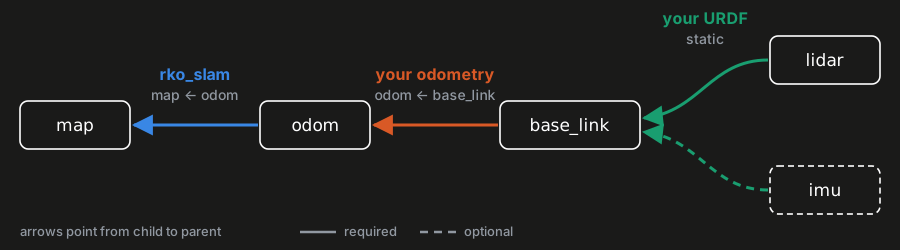
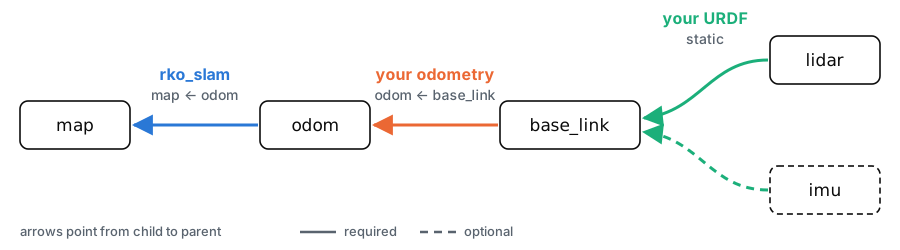
rko_slam works in one frame, base_frame: the sub-maps, keyposes and trajectory are expressed in it. Left unset, it is
the scan’s frame, its frame_id.
The odometry is the pose of base_frame in odom_frame, read from TF at each scan’s timestamp. A static transform on
TF connects base_frame to the scan’s frame, read once on the first scan. A second static transform connects
base_frame to the IMU’s frame, read once on the first IMU message, after the first scan when base_frame is unset.
Offline, odom_tum_path takes the odometry from a TUM file instead of the bag’s /tf. The file holds the pose of
base_frame in odom_frame.
rko_slam publishes map_frame <- odom_frame, which makes map_frame <- base_frame the SLAM estimate.
Topics and transforms#
Subscribed:
Topic / transform |
What |
|---|---|
|
the scans, taken as already deskewed unless you set |
|
the IMU whose accelerometer levels the map, the same one your odometry reads |
|
the odometry, looked up at each scan’s timestamp |
|
static, read once on the first scan to bring every scan into |
|
static, read once on the first IMU message |
Published:
Topic / transform |
What |
|---|---|
|
the correction, flipped by |
|
each closed sub-map, with a |
|
the keyposes with their odometry and closure edges ( |
|
each accepted closure pair as a two-tone cloud ( |
|
offline only, how far into the bag the node is |
Visualization#
Three publishers, each off by default:
publish_sub_maps:=true, each closed sub-map as a point cloud onrko_slam/sub_maps, with asub_map_<i>TF chain.publish_keypose_graph:=true, the keyposes as spheres with the odometry edges between consecutive keyposes and the closure edges, as markers onrko_slam/keypose_graph.publish_closure_maps:=true, each accepted closure as the two sub-maps it matched, one colour each, onrko_slam/closure_maps.
rviz:=true turns all three on and opens RViz with the default view, config/default.rviz, set to your frames. Under
odometry_and_slam.launch.py it also shows rko_lio’s deskewed scan and its local map; with your own
rko_lio_config_file, the local map shows only if that file publishes one. Pass your own config with
rviz_config_file:= and it is used unchanged, with nothing forced on.
Outputs#
With dump_results:=true, a SLAM run writes <results_dir>/<run_name>_<n>/, run_name defaulting to rko_slam online
and to the bag’s name offline:
File |
What |
|---|---|
|
the trajectory |
|
the keypose pose graph, in g2o text with rko_slam’s own comment lines and gravity edges; its edge weights are in |
|
the config the run used |
|
profiling logs, with |
|
the trajectory as an image, loop closures in red |
|
the sub-maps, each in the frame of its keypose, and the input to |
When it aligns at least two sessions, align.launch.py writes <results_dir>/<run_name>_<n>/:
File |
What |
|---|---|
|
the joint pose graph over all sessions |
|
each aligned session’s trajectory in the joint frame, |
|
the config the run used, with the run directories |